PowerTCP Mail for .NET
from $349.00Available Platforms


Comprehensive Email Components for .NET
Email components seamlessly combine security, efficiency, and ease of use so you can quickly develop custom email handling applications. Includes classes for creating, sending and receiving email. C# and VB code snippets and sample applications will give your project a boost. Try our on-line WebMail app for a quick demo!

Consulting and Custom Development
Pop pop1 = new Pop();
//Connect and log into
the account
pop1.Session.RemoteEndPoint = new
Dart.Mail.IPEndPoint("myPopServer.com", Pop.GetDefaultPort(pop1.Session));
pop1.Session.Username =
"myUsername";
pop1.Session.Password = "myPassword";
pop1.Connect();
pop1.Authenticate(false, true);
//Gracefully logout of the session
pop1.Close();
Manage email using standards-based protocols
Feature Overview
- Simple Mail Transfer Protocol (SMTP) and Post Office Protocol (POP3) components send and receive email, respectively
- Internet Message Access Protocol (IMAP4) component manages email on IMAP4 servers (Office 365, Gmail, Yahoo, Exchange, etc.)
- Multipurpose Internet Mail Extensions (MIME) enable the encoding and decoding of non-ASCII data like international UNICODE text and binary data
- Secure/Multipurpose Internet Mail Extensions (S/MIME) version 3.0, 3.1, 3.2 enable message signing (authentication) and encryption (privacy)
SMTP, POP3, IMAP4 components interact with servers
- Integrates .NET features, including generics, IPv6, dual-stack sockets and X509 certificates
- Secure: Link-level encryption (SSL 2.0, SSL 3.0, PCT, TLS 1.0, 1.1, 1.2, 1.3) is controlled using simple session properties
- Progress events report message upload/download activity
- Log events report data for debugging and display purposes
- Send any custom command using the exposed TCP connection
MailMessage class at the core of the system
- Represents a decoded MIME, Secure MIME (S/MIME), or non-MIME (straight ASCII) Internet email message
- Dynamic encoding occurs when the encoding stream is read from; dynamic decoding occurs when encoding stream is written to
- Can be used independent of protocol components as a general-purpose MIME or S/MIME encoder/decoder
- Rich object model represents each header, text, html, attachment, part, and resource element
- Attachments are decoded and stored in temp files by default, but can optionally be stored in MemoryStreams if disk access is not desired
- Fast on-the-fly message decoding eliminates intermediate files and delays by streaming encoded
message data from the source server to the destination MailMessage
Integrated security protects data at 3 levels
- Level 1: comprehensive login options authenticate the client to the server; OAuth 2.0 (XOAUTH2), GSSAPI, NTLM, APOP, CRAM-MD5, LOGIN, PLAIN, and clear-text
- Level 2: SSL2, SSL3, PCT, TLS 1.0, 1.1, 1.2, 1.3 implements end-to-end encryption between your application and the email server
- Level 3: S/MIME encoding/decoding authenticates the integrity and author of the message and encrypts the content
- Included X509 certificate management support is used to manage security at levels 2 and 3
Ease-of-Use and Efficiency
- Create HTML mail (MHTML) from HTML documents with one line of code
- MailMessage class provides a nested hierarchy of MIME entities (parts) you can easily manipulate:
- Properties expose header labels and enumerate multipart content
- IsMime property to control the use of MIME encoding on a per message basis.
- MailMessage.GetEncodingStream() returns a Stream that decodes when Write() is called (the MailMessage is incrementally populated with decoded content) and encodes when Read() is called (the user's buffer is filled with the next segment of the encoded MailMessage)
- Suitable for advanced WinForms applications as well as single-threaded services, console and web applications
- Winform samples demonstrate robust multi-threading features and Task-based Asynchronous Pattern (TAP)
- .NET-centric, reusing classes from System.Net.Mail and System.Net.Mime

Samples & Code Snippets
-
Imap Client
Multi-threaded IMAP client with full-featured security options -
Imap Part Retriever
Multi-threaded IMAP client displays unpopulated message parts and supports their selective downloading -
Pop Client
Multi-threaded POP client with full-featured security options. -
Message Editor
Demonstrates the MessageEditor control. Open, edit, save .eml files
Included with PowerTCP Mail for .NET
Features
Feature Overview
- Simple Mail Transfer Protocol (SMTP) and Post Office Protocol (POP3) components send and receive email, respectively
- Internet Message Access Protocol (IMAP4) component manages email on IMAP4 servers (Office 365, Gmail, Yahoo, Exchange, etc.)
- Multipurpose Internet Mail Extensions (MIME) enable the encoding and decoding of non-ASCII data like international UNICODE text and binary data
- Secure/Multipurpose Internet Mail Extensions (S/MIME) version 3.0, 3.1, 3.2 enable message signing (authentication) and encryption (privacy)
SMTP, POP3, IMAP4 components interact with servers
- Integrates .NET features, including generics, IPv6, dual-stack sockets and X509 certificates
- Secure: Link-level encryption (SSL 2.0, SSL 3.0, PCT, TLS 1.0, 1.1, 1.2, 1.3) is controlled using simple session properties
- Progress events report message upload/download activity
- Log events report data for debugging and display purposes
- Send any custom command using the exposed TCP connection
MailMessage class at the core of the system
- Represents a decoded MIME, Secure MIME (S/MIME), or non-MIME (straight ASCII) Internet email message
- Dynamic encoding occurs when the encoding stream is read from; dynamic decoding occurs when encoding stream is written to
- Can be used independent of protocol components as a general-purpose MIME or S/MIME encoder/decoder
- Rich object model represents each header, text, html, attachment, part, and resource element
- Attachments are decoded and stored in temp files by default, but can optionally be stored in MemoryStreams if disk access is not desired
- Fast on-the-fly message decoding eliminates intermediate files and delays by streaming encoded message data from the source server to the destination MailMessage
SMTP is for sending email
- Authentication support: OAuth 2.0 (XOAUTH2), CRAM-MD5, GSSAPI and NTLM (with single-sign-on), LOGIN, PLAIN
- Messages can be sent via relay servers, intermediate mail servers, or directly to recipients' domain mail servers
- Send simple email with a single line of code, or build a complex MailMessage and send it
- Delivery Status Notification (DSN) fully supported
- Supports pipelining of commands without waiting for server acknowledgments
POP3 is for downloading email
- Secure
- Authentication support: OAuth 2.0 (XOAUTH2), CRAM-MD5, GSSAPI and NTLM (with single-sign-on), LOGIN, PLAIN, clear-text, APOP
- Decrypt and/or verify signed S/MIME messages - Easy message management - default behavior populates message size and id without downloading message content
- Dynamic message retrieval - populate selected messages with just the header, header plus a little content, or the entire message
IMAP4 downloads mail too, and adds remote mail management
- Secure
- Authentication support: OAuth 2.0 (XOAUTH2), CRAM-MD5, GSSAPI and NTLM (with single-sign-on), LOGIN, PLAIN, clear-text
- Decrypt and/or verify signed S/MIME messages - IMAP4 commands synchronize the local object model with the server (change the local model and the server is changed)
- ImapMessage class represents a message in a mailbox - use to change server-side message flags and get a single message
- Mailbox class represents a server-side mailbox that contains messages - use to alter mailbox properties, enumerate messages, get messages in bulk and append new messages
- MailboxCollection class represents child mailboxes - use to manage nested mailboxes
- Update event informs client of dynamic updates to the selected mailbox
- Retrieve an entire message, headers only, attachments only, or any part desired
Ease-of-Use and Efficiency
Ease-of-Use is an attribute of class design
- Class properties are used for several purposes, making the object model more concise and easier to learn:
- Default (uninitialized) values will work for most applications, so research may be avoided
- Configuration properties control behavior (like SSL security), so users are usually spared low-level detail programming
- Configuration properties are grouped in classes that can be easily serialized for later use
- Some properties are high-level shortcuts. MailMessage.Html will search MailMessage.Parts to return text from the first "text/html" part found
- Classes merge low-level detail (typically properties that can be read) with high-level methods (that use overloads to provide default parameters). This technique combines completeness with ease-of-use.
- F1 help documentation is fully supported.
- MessageEditor control (with source code) is provided to visualize and/or edit any MailMessage.
- Reuse
- Existing .NET Mail and Mime classes are reused (MailAddress, MailAddressCollection, ContentType, ContentDisposition, etc.), minimizing the product learning curve and enhancing stability.
- Sample applications provide dialog boxes that can be quickly customized.
- Class hierarchy is carefully designed to locate selected convenience properties and methods in base classes for re-use by derived classes.
System segmentation promotes efficiency
- MailMessage (and other classes derived from Part) localize message creating, editing, and interpretation.
- MailMessage.GetEncodingStream() returns a Stream that performs encoding and decoding.
- Using Write(), the provided buffer is decoded and the MailMessage is incrementally populated.
- Using Read(), the provided buffer is filled with the next encoded segment that can be streamed to the server.
- Encoding/decoding is interleaved with socket operations, resulting in optimal performance. - Smtp, Pop, and Imap components are optimized for socket communications. Messages are transferred on demand. Worker thread efficiently sleeps while waiting for socket data.
Controls, Components and Classes
- 20 components and major classes
- 12 full-featured sample projects (VB and C# versions)
- Fully integrated Help 2.0 Docs, including extensive examples and tutorials
- Free Introductory Support
| Class | Description |
|---|---|
 Imap Component Imap Component
|
Uses IMAP4 to remotely manage and download email |
 Pop Component Pop Component
|
Uses POP3 to download email |
 Smtp Component Smtp Component
|
Uses SMTP to upload email |
 MessageEditor Control MessageEditor Control
|
Visual editor used to view/edit a MailMessage |
|
MailMessage Class
|
Represents a MIME or S/MIME email message |
| HeaderDictionary Class | Dictionary representing header lines (header labels are the lookup keys) |
| Part, Multipart, Resource, Textpart, Htmlpart, Attachment Classes | MailMessage supporting classes model any MIME or S/MIME email message |
| MultipartContent Class | Provides nested access to multipart MIME entities |
| DeliveryStatusNotification Class | Provides DSN configuration parameters |
| ImapMessage Class | Represents a message on an IMAP server |
| ImapResponse Class | Represents a response from an IMAP server |
| Mailbox Class | Represents a mailbox on an IMAP server that contains a collection of messages and child mailboxes |
| MailboxCollection Class | Collection containing Mailbox objects supports adding, deleting and renaming mailboxes |
| PopMessage Class | Represents a message on a POP3 server |
| Proxy Class | Provides an easy way to communicate with proxy servers |
Supported Environments
PowerTCP Mail for .NET supports .NET Framework version 2.0 through 4.8 and .NET Standard 2.0 (.NET Core, .NET 5, .NET 6, .NET 7, etc.).
PowerTCP for. NET components can be used with any .NET compliant language, see the list below.
Supported languages:
- C#
- VB.NET
- Managed C++
- Powershell
Tested in the following application environments:
- Windows forms desktop applications
- Windows console applications
- Windows ASP.NET web applications and Web Sites
- Windows service applications
- Windows web service applications
- Windows .NET Framework 4 Client Profile
- Windows Presentation Foundation (WPF) applications
Tested in the following development environments:
- Visual Studio .NET (2010, 2012, 2013, 2015, 2017, 2019, 2022)
- Mono platform 2.10.9 or greater (NTLM and GSSAPI authentication only supported currently on Microsoft Windows OSes)
- .NET Standard 2.0 supported platforms: https://docs.microsoft.com/en-us/dotnet/standard/net-standard

PowerTCP for .NET components do not currently support execution within Silverlight. If you are interested in using Dart products within your Silverlight solution, contact support@dart.com for more options.
New PowerTCP Mail for .NET sample Projects have been added to include .NET Core 2.0 projects, referencing the Dart.Mail.Standard dll. Look for the  to identify these examples.
Code Examples
These examples demonstrate basic product functionality.
Email Examples
| Code Snippet | Description |
|---|---|
| Imap Example | How to access emails via Imap, and how to save them and their attachments to disk. Also demonstrates SSL/TLS. |
| Pop Example | How to access emails via Pop, and how to save them to disk. |
| Smtp and Email Creation Example | How to create an email, add an attachment to it, and send it via Smtp. |
Example Projects
The samples are fully functioning C# and VB applications demonstrating the Imap, Pop and Smtp components, the MessageEditor control, and include complete source code.
Samples marked with an * demonstrate how to obtain OAuth 2.0 credentials.
| Example Name | Description |
|---|---|
| ImapDownloader
|
Single-threaded console app demonstrates email downloading using the Imap component. |
| PopDownloader
|
Single-threaded console app demonstrates email downloading using the Pop component. |
| MessageSender
|
Single-threaded console app demonstrates sending email using the Smtp component. |
| Imap Client * | Multi-threaded IMAP client with full-featured security options. |
| Imap Client Task Async * | Same as Imap Client, but uses Task-based Asynchronous Pattern (.NET 4.5) |
| Imap Part Retriever * | Multi-threaded IMAP client displays unpopulated message parts and supports their selective downloading. |
| Message Editor | Demonstrates the MessageEditor control. Open, edit, save .eml files. |
| Pop Client * | Multi-threaded POP client with full-featured security options. |
| Pop Client Task Async * | Same as Pop Client, but uses Task-based Asynchronous Pattern (.NET 4.5) |
| Smtp Client * | Multi-threaded SMTP client with full-featured security options. |
| Smtp Client Task Async * | Same as Smtp Client, but uses Task-based Asynchronous Pattern (.NET 4.5) |
| WebMail | A powerful web-based IMAP mail client that manages email on an IMAP server. |
The following is a list of public releases for all components shipped with PowerTCP Mail for .NET (Latest Release 2021-3-22)
PowerTCP Mail for .NET
Current Version: 4.3.13.0
4.3.13.0 Released: 2021-03-22
- OAuth 2.0 (XOAUTH) compatibility for Office 365 POP and SMTP servers.
4.3.12.2 Released: 2020-12-16
Product fixes in this release:
- Fixed a minor compatibility issue so that Dart.Mail.Standard.dll can be used with .NET 5.0.
4.3.11.0 Released: 2020-04-07
- Update: Implemented comprehensive OAuth 2.0 form in applicable Example Projects.
- Compatibility improvement: added support to decode single digit day of month on date time values store in content-disposition. (TFS 1079)
- Compatibility improvement: added an additional SecureEncrypt overload to MailMessage to allow the SubjectIdentifierType to be specified which can improve SMIME compatibility with mail clients. For example using AES encryption with Mozilla Thunderbird requires that SubjectIdentifierType.SubjectIdentifierKey to be used. (TFS 1089)
- Resolved: Base64 encoded attachments failing to decode when the mail line length is set to a number not divisible by four (4). (TFS 1096)
- Resolved: instance in which quoted filenames could fail to decode correctly. (TFS 1100)
- Resolved: names specified in content-type headers failing to decode if they contained a semi-colon, followed by white space. (TFS 1101)
4.3.10.0 Released: 2019-06-17
- Fixed an issue in the .NET Standard assembly that resulted in string resources not being available when certain exceptions occurred. (TFS 1075)
- Fixed an issue that resulted in .NET Standard assemblies being unusable in newer .NET Core preview releases.
- Fixed an issue where embedded base64 encoded MIME resources would cause a missing reference exception. (TFS 1073)
- Fixed an issue where NTLM/GSSAPI Single Sign On functionality would not work if Authentication was set to Auto. (TFS 1077)
4.3.9.4 Released: 2018-09-24
- Refactored header parsing resulting in better handling of unorthodox headers and header parameters.
- Added a property for setting the Authorization Identity when using Imap's PLAIN authentication mechanism.
- Resolved various parsing issues related to RFC822 message parts and RFC822 message part attachments. (TFS 1069, TFS 1070, TFS 1071)
4.3.8.1 Released: 2018-09-24
- Various improvements made in handling malformed mail messages and message headers.
4.3.7.1 Released: 2018-08-02
- An issue where RFC822 parts may not be decoded correctly when their encoding type is Quoted-Printable has been fixed. (1049)
4.3.6.2 Released: 2018-04-04
- Added support for .NET Standard 2.0 and .NET Core 2.0
- New .NET Core 2.0 sample projects, referencing the Dart.Mail.Standard dll
- Updated trial license operation for use on .NET Standard-compatible platforms
- Details regarding trial operation for Dart.Mail.Standard.dll can be found in the Licensing and Trial Operation topic in the included help documentation
- Resolved an issue where some attachment filenames were not properly decoded. (1025)
- Resolved an issue where the component would use the systems native end of line sequence instead of CRLF. (1026)
- Resolved an issue where in line links to web resources in HTML emails could cause an exception be thrown if the URL began with capital letters, ex: HTTP instead of http. (1035)
4.3.5.0 Released: 2017-03-08
- Visual Studio 2017 compatibility.
4.3.4.0 Released: 2017-02-01
Product fixes in this release:
- An issue where spaces were incorrectly removed when only a portion of header text was Q-encoded was resolved. (958)
- An issue where attachments names were not parsed out correctly when the attachment part headers contained both a name and filename parameter has been resolved. (964)
- Some servers do not support the reciept of the EHLO command after authentication. EHLO will no longer be sent after authentication has occurred. (983)
- An issue where FETCH responses containing parentheses within quoted strings were not being parsed correctly has been resolved and the responses will now be correctly parsed. (984)
- An issue where IMAP Mailbox name encodings could be persisted between separate IMAP sessions has been resolved. Now all encodings revert to their default state when a new connection is attempted. (989)
- An issue where LIST responses were not correctly parsed if NIL was in the hierarchy separator place was resolved. (990)
4.3.3.0 Released: 2016-07-19
Product fixes in this release:
- An issue that could result in a null reference exception being thrown while retrieving email headers from a POP server was resolved. (915)
4.3.2.0 Released: 2016-06-01
Product fixes in this release:
- Mailbox hierarchy delimiters that are an escaped quoted string character (ex: "\\") will now be decoded and parsed correctly. (901)
4.3.1.0 Released: 2016-04-15
- Improved decoding of email messages with nonconformant MIME boundaries.
- Improved samples to display HTML parts with charset headers that are not parsed correctly by the WebBrowser control.
4.3.0.2 Released: 2016-04-07
- XOAUTH2 authentication support for Imap, Smtp, and Pop has been added.
- MailMessage.ReplyInline and MailMessage.ReplyAllInline methods have been added which will prepend a reply to the original message text.
- Imap.GetAllMailboxes has been added so that a flat list of mailboxes can be retrieved.
- Imap.Select has been added to provide support for selecting mailboxes using an absolute path.
- Support for UTF8=Accept and UTF8=Only server advertised 8-bit capabilities. Its use can be controlled with the ImapSession.AutoUtf8 property.
- Support for RFC3030 (Chunking and Binary mime) and RFC6152 (8-bit Mime) for Smtp has been added.
- Support for Xtext encoding as specified in RFC 3461 has been added.
-
Developer Note:
In order to provide more concise groupings for server settings the Smtp and Imap controls now use SmtpSession and ImapSession to store settings instead of the previously shared MailSession.
Product fixes in this release:
- If PunyCode decoding fails for any reason the original encoded header will be preserved. (661)
- Instances where some multi-line QP encoded subject headers would fail to decode correctly have been addressed. (666)
- An issue where some SMIME messages with a content-type of application/pkcs7-mime would fail to decode has been corrected. (679)
- When an email message is added as an attachment the content-type is now correctly set to application/octet-stream. (711)
- In issue where MailMessage.ReplyAll could incorrectly populate recipient data has been addressed. (717)
- An error in handling extended parameters as described in RFC2231 was addressed. (826)
4.2.3.1 Released: 2015-04-01
- The Bcc header will now be included when a message is saved to disk and when loaded from disk.
-
Functional Change:
In order to make email message data available if a signature fails validation, MailMessage.SecureDecode() no longer automatically validates SMIME signatures. Signatures can now be validated using the returned SignerInfoCollection, ex:
System.Security.Cryptography.Pkcs.SignerInfoCollection signatories = mailMessage1.SecureDecode();
foreach (System.Security.Cryptography.Pkcs.SignerInfo signator in signatories)
signator.CheckSignature(false);
Product fixes in this release:
- Parts with a Content-Disposition of 'inline' but a Content-Type of 'multipart' will now be parsed as a Multipart, not a Resource. (620)
- MIME emails with UUEncoded attachments will now be decoded regardless of the presence or absence of the begin and end affixes, and encoding now includes the begin and end affixes. (622)
- Encoded word email addresses containing ";" will now be decoded correctly. (633)
- Email decoding will now succeed when the Bcc field is populated with an invalid email address. (634)
- When using Smtp, if Auto authentication is chosen and no user name and password are provided then authentication will default to 'None'. (637)
- Emails with RFC822 attachments that contain an attachment will no longer throw an IOException when Dispose is called. (638)
4.2.2.2 Released: 2014-09-29
Product fixes in this release:
- Calling MailMessage.Clear() will result in the message being initialized to a MIME message. (499)
- If there is a content disposition header present in a mail part then a resource or attachment part will always be added regardless of content type. (511)
- UUencoded attachments will now be encoded with a grave character instead of a space. (519)
- Mail message header values that use quoted printable encoding now decode correctly. (545, 549)
4.2.1.2 Released: 2014-04-11
- The MailMessage.IsMime property has been added to indicate and control the use of Mime encoding for the current message. Messages that are not Mime encoded will now retain their original encoding.
- Support for decoding headers encoded with the extensions described in RFC 2231 "Parameter value and encoded word extensions" has been added.
- The FAST and FULL fetch macros defined in RFC3501 have been added to the ImapMessageInfo enumeration.
- SmtpResults.Recipients has been changed from a list of EmailAddress objects to list of Recipient objects in order to include a SmtpResponse property that will contain the response of the sending server for each successful send.
Product fixes in this release:
- When calling MailMessage.ForwardAsAttachment all temporary files will now be created in directory specified by Attachment.Directory instead of the system temporary directory. (359)
- Malformed parts with no content-encoding would result in a null part being added to the MailMessage object, these parts will now add a text/plain part. (395)
- Imap flags for messages residing on a Gmail server now update correctly when messages are fetched. (396)
- An issue where unsolicted server responses could interrupt email message processing has been addressed. (397)
- Email parts without a specified content type containing are created as text/plain parts per RFC 2046. (401)
- Subject and Comment fields containing the semicolon (;) character will now be parsed correctly. (419)
- MailBox.Add now returns void. After the message has been added a NOOP can be performed to update the mailbox state. (434)
- Sender and ReplyTo are now parsed out if present when fetching an email's envelope with IMAP. (450)
- Imap.Seen will default to true when fetching a message with ImapInfo.Message or ImapInfo.Text and not specifying peek. Previously messages flagged as seen on the server would be flagged as unseen to the component. (454)
4.2.0.1 Released: 2013-12-17
- Added the Attachment.Directory static property which indicates where temporary files will be stored for emails after decoding.
Product fixes in this release:
- Trial notifications have been revamped to be more friendly with service based projects. (TFS294)
- Dispose was added to message and protocol objects so that temporary files will be deleted when dispose is called for those objects. Please see the documentation for details. (TFS329)
4.1.1.1 Released: 2013-10-02
Product fixes in this release:
- Improved message cloning when malformed file attachment headers are present. (TFS277)
- Resolved an issue with Part.EncodingMap that could cause a race condition in multi-threaded applications. (TFS292)
- Improved the message object representation of mail messages that are attachments when only the structure of the parent email is retrieved with Imap. (TFS299a)
- Improved support for the legacy RFC822 attachment format. (TFS299b)
- Improved parsing of Imap email structure to provide access to parts of an email that is attached to the parent email. (TFS300a)
- Resolved an issue with retrieving the same attachment part repeatedly. (TFS300b)
- Resolved an issue where filtering for multipart message parts would return no parts. (TFS301)
- Resolved a segmentation issue that could occur while decoding quoted printable messages. (TFS313)
4.1.0.4 Released: 2013-08-02
- Addition of the MessagePart object provides support for in place decoding of message parts of content-type message/rfc822 which allows for any attachments or resources of that part to be promoted up to their respective top-level collections.
- PowerTCP Mail for .NET is operational with Mono 2.10.9 or greater with the exception of NTLM and GSSAPI authentication.
Product fixes in this release:
- If a charset is not present in the message or part headers but is detected in the HTML body, the charset in the HTML body will be used to decode the content of that part. (TFS 214)
- Support for split-line word-encoding added. (TFS 217)
- Mail messages received as an attachment to another mail message will now be decoded in place. (TFS 255)
- Allow decoding to succeed if there is a missing terminating "--" in the closing boundary demarcation of a multipart MIME encoded mail message. (TFS 265)
- Accommodated for System.Net.Mime.ContentDisposition producing incorrectly encoded Date/Time headers. (TFS 268)
- Resolved ImapMessage.Info not always updating correctly when returning to a previously selected mailbox. (TFS 269)
4.0.1.1 Released: 2013-04-12
- Dart Communications is pleased to announce the release of PowerTCP Mail for .NET 4.0.
Some of the exciting new features include:
- Model-View-Controller design uses fewer resources, is more flexible, and produces code that is easier to maintain
- Improved use of .NET Features including generics and IPv6
- Robust IMAPv4. POP3 and SMTP support
- Improved thread-safe design
- SSL support for secure communications
- Added NTLM and GSSAPI, supporting single sign-on
- Improved support for internationalized e-mail addresses and domains when in .NET 4.0+
- Support for DNS resolution of internationalized domain names
- Simplified MailMessage object, making it easier to use
- Support for S/MIME encrypted and signed e-mails
- Support for Windows applications, services and ASP.NET web applications
- Many sample projects for C#, VB.NET, including ASP.NET
- Comprehensive MS Help 2.0 and Help Viewer 1.0 integrated documentation
- Stand-alone and online documentation also provided
- NET Framework Client Profile compatible
- 64-bit OS support
PowerTCP 4.0 Mail for .NET Upgrade Guide >
No more Async methods
Previous versions of PowerTCP and PowerSNMP implemented an event-driven model for asynchronous use. In addition to a synchronous method, each operation had an asynchronous "BeginXXX" method and corresponding "EndXXX" event. For example, to receive data asynchronously using the Tcp component, the developer called BeginReceive and waited for the EndReceive event to fire with data. In the meantime, other code was free to execute.
In the new design, asynchronous methods are no longer needed. Instead, the developer uses one or more synchronous methods (for example, "Receive") within function, and then passes a delegate referring to this function to the component's Start method. The Start method then executes the function a worker thread.
Marshaling data back to the UI thread
It is sometimes necessary to pass information from a worker thread to an element on the UI thread. The new design includes Marshal functions to simplify this operation. Each Marshal overload corresponds to an event handler that executes on the UI thread and provides access to data passed by the Marshal method.
No more "pseudo-blocking"
Methods in the new design are now true-blocking calls. In previous versions, methods were "pseudo-blocking," meaning that UI events could be processed while the call blocked. With the new design, the UI thread is blocked if a method is called from within the UI thread. The Start method should therefore be used in UI environments so normal UI processing is preserved.
Use of IPEndPoints
Many methods in the new design include overloads that take IPEndPoint parameters to facilitate IPv6 use. A new IPEndPoint derived class provides several overloads for easy IPEndPoint creation, including automatic hostname resolution.
3.2.1.0 Released: 2011-01-05
Product fixes in this release:
- A login error introduced in version 3.2.0.1 was addressed. "An address incompatible with the requested protocol was used" error would occur under certain conditions if the mail server supported IPv6. (5374)
3.2.0.1 Released: 2010-10-21
- PowerTCP Mail for .NET has been updated with VS 2010 integration.
- PowerTCP Mail for .NET now supports .NET Framework 4 Client Profile.
Product fixes in this release:
- Fixed Smtp.Authentication failures when the server supported options other than what the property was set to. (5133)
- Fixed index out of range exception when examining Attachments collection for messages with nested attachments. (5146)
- Fixed SMTP authentication problem for servers that would send more options after explicitly negotiating a secure connection. (5194)
- Fixed Stack overflow exception that would occur when constructing MessageStreams from some file streams. (5224)
- MessageStream can now decode messages using CP1252 encoding type. (5251, 5318)
- Fixed ArgumentOutOfRange exception when referencing some attachments in a MessageStream. (5333)
- Provide better error message for invalid "Search 0" response provided by SmarterMail v7. (5343)
3.1.0.1 Released: 2009-06-29
- A UsePipelining property has been added to the Smtp component, permitting users to choose whether or not to use PIPELINING when the server supports it.
- Added a MimeAttachmentStream.ContentId property.
Product fixes in this release:
- Fixed problems with some Smtp servers when PIPELINING was used with Explicit security. (4069)
- The MessageStream property now has a default value (MessagePriority.Normal), instead of being null. (4723)
- Fixed an issue with decoding headers that span multiple lines. (4724)
- When Imap Gets are performed with the UID option, ImapMessage.Uid is now populated. (4726)
- An encoding exception that would only appear in Japanese Operating Systems has been fixed. (4758)
- The PopLoginMethod.Apop option now works correctly. (4762)
- The IsMime property now works correctly. (4774)
- The Logout method will always timeout now if no response is received from the server. (4781)
- Under certain circumstances the Pop component Timeout would incorrectly be twice the value specified. (4864)
- The NotSeen Imap Search Criterion now works. (4883)
- The Content-Type and Date headers are no longer cleared when a message is encrypted or signed for S/MIME. (4887)
- Setting the Content-Type on the message level now correctly affects the appropriate parts of the message. (4889)
- The Imap component now uses the manually set Security value for Implicitly secure connections, instead of always using TLS. (4894)
- Certificates for wildcard domains such as *.dart.com are now supported. (4917)
- Connecting asynchronously with Imap after trying to connect asynchronously to a non-existent server no longer causes an error. (4935)
- A BeginLogin overload was defaulting to the Implicit security port instead of 110. (4937)
- A problem with Imap and Implicit security was addressed. (4938)
- The Content-Type of a part can now be set after the part has been added to a message. (4942)
- Fixed a stack overflow exception caused by certain non-standard messages. (4973)
- Fixed an issue with Smtp using Explicit security and authentication. (4977)
- Fixed a problem with fetching some message BODYSTRUCTUREs with Imap. (4989)
- Corrected condition in which messages could have two FROM headers. (5084)
- Fixed a Quoted-Printable problem when multiple Smtp components were used on multi-processor machines. (5091)
3.0.3.2 Released: 2008-04-08
- If a message is sent with no From header or Smtp.MailFrom, the component looks for a Sender header to use as the From address.
- There is a new DeliveryStatusNotification.Enabled property which can be set to false to prevent DSN extensions, even when the server supports them.
Product fixes in this release:
- An Imap compatibility problem with Domino server has been addressed. (4506)
- The MessageStream no longer inserts a line into the headers of a 0 part message. (4573, 4651)
- S/MIME is now fully functional on 64 bit machines. (4579)
- A message truncation problem as been addressed. (4637)
- Friendly names that include '@' are now parsed correctly. (4650)
- The MessageStream now correctly decodes long filenames of messages created by Thunderbird. (4688)
3.0.2.0 Released: 2008-01-30
Product fixes in this release:
- Addressed problem with Smtp component where initialization would fail if default DNS servers were not found on the system.
 PowerTCP Mail for .NET Smtp Component
Easily send email messages to any SMTP server.
- Authentication support: CRAM-MD5, GSSAPI and NTLM (with single-sign-on), LOGIN, PLAIN
- Messages can be sent via relay servers, intermediate mail servers, or directly to recipients' domain mail servers
- Send simple email with a single line of code, or build a complex MailMessage and send it
- Compose advanced email formats, including MHTML (HTML mail)
- Select secure (SSL 2.0, SSL 3.0, PCT, TLS) or unencrypted TCP communications
- Sessions are automatically managed; no need to explicitly "Login"
- Progress event reports progress of the Send operation
- Send email with a single line of code
- Encrypt and/or sign S/MIME messages
- Send any command to the server using the exposed TCP connection
- Log event exposes the underlying TCP communication
- DSN (Delivery Status Notification) fully supported
- Supports pipelining of messages, increasing delivery speeds
 PowerTCP Mail for .NET Imap Component
Easily manage and download messages from any IMAP4 server. A local object model makes remote mail management easy, with no knowledge of IMAP4 commands required!
- Multithreaded design
- Commands from multiple worker threads are synchonized and "queued up" (the CommandCount property indicates how many commands are in the queue)
- Idle() will block (and raise the Update event asynchronously) until a command is sent on another thread, automatically cancelling the IDLE command and allowing Idle() to return
- Imap Client sample demonstrates advanced multithreaded use - Authentication support: CRAM-MD5, GSSAPI and NTLM (with single-sign-on), LOGIN, PLAIN, clear-text
- Select secure (SSL 2.0, SSL 3.0, PCT, TLS) or unencrypted TCP communications.
- There is no need to understand the IMAP4 protocol. Use the Imap component's intuitively named properties and methods and the appropriate command is sent to the server.
- Server-side mailboxes are represented as Mailbox objects. Used to change properties or get details about a mailbox.
- Multiple mailboxes are represented as a MailboxCollection. Used to manage nested mailboxes.
- Server-side messages are represented as ImapMessage objects. Used to change message flags or get message data.
- Authenticate and decrypt Secure MIME (S/MIME) messages.
- Flexible message retrieval enables the developer to retrieve an entire message, headers only, attachments only, or any part desired.
- Imap.Connection property exposes the TCP connection used to send data. Use this object to get connection-level information, or log all data passing through the connection.
- Other events include Progress (raised when a message is transferring), StateChanged (raised when the state of the connection has changed), and Update (raised when the selected Mailbox has been updated with a new message or a message has been deleted by another user).
 PowerTCP Mail for .NET Pop Component
Easily download messages from any Post Office Protocol (POP3) server.
- Authentication support: CRAM-MD5, GSSAPI and NTLM (with single-sign-on), LOGIN, PLAIN, clear-text, APOP
- Select secure (SSL 2.0, SSL 3.0, PCT, TLS) or unencrypted TCP communications.
- Easy session management. Default behavior is to login and populate a PopMessageCollection with size and id information for each message.
- Flexible message retrieval. Get an entire message, only the header, or only a specified number of lines.
- Attachments can be decoded and stored as files or MemoryStreams.
- Advanced decoding. Attachments are decoded on-the-fly, making your application faster and more efficient.
- Authenticate and decrypt S/MIME messages.
- Progress event reports download progress.
- Send any command to the server using the exposed TCP connection.
- Log event can be used to monitor data.
 PowerTCP Mail for .NET MailMessage Class
The MailMessage class is at the core of the product. It is created when an encoded email message is decoded, or when it is "built-up" in code by setting properties and adding MIME entities (parts). The former usage is typical when using the Pop and Imap components to decode messages. The latter usage is typical when composing email prior to sending it using the Smtp component.
The PowerTCP MailMessage class is more capable than the MailMessage class included with the .NET framework:
- System.Net.Mail.MailMessage is used for basic message composition only, whereas Dart.Mail.MailMessage supports the interpretation of decoded messages and message editing
- Dart.Mail.MailMessage exposes an encoding/decoding Stream, allowing developers to stream encoded data to any destination
- Dart.Mail.MailMessage supports S/MIME encoding and decoding
MailMessage represents a decoded MIME, Secure MIME (S/MIME), or non-MIME Internet email message. MailMessage.GetEncodingStream() returns a Stream that performs encoding and decoding of the message. Writing to this Stream incrementally populates the MailMessage with decoded content. Reading from this Stream fills the user's buffer with the next segment of encoded bytes.
MailMessage is used by the Smtp component to encode email and by the Pop and Imap components to decode received email. MailMessage can also be used independently as a general purpose S/MIME encoder/decoder. Supported transfer encoding types are Base64, Quoted Printable and UUEncode. Unicode encoding takes advantage of all encoders installed on the system. Every MIME attachment, MIME part, and label element is represented as an object, giving you unsurpassed processing convenience.
PowerTCP Mail for .NET Features
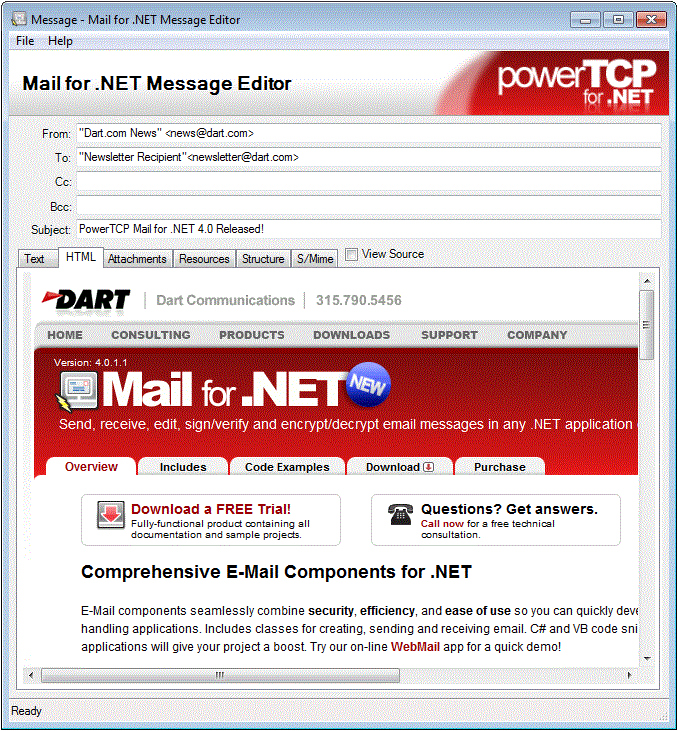
PowerTCP Mail for .NET MessageEditor Control
The MessageEditor Control, included in Dart.Mail.Controls.dll, can be used as a (read-only) email message viewer or as a (read-write) email message editor. Source code is provided.
What is Mono?
Mono is an open-source implementation of Microsoft's .NET Framework, allowing .NET applications to be developed and executed in many non-Windows environments, including Linux, Sun Solaris, and Mac OS X.
Because the majority of Dart products are non-visual components and don't rely on native GUI libraries, they are a natural fit for cross-platform Mono development. Dart is committed to ensuring that all .NET products are functional on the Mono platform, and is currently undergoing compatibility testing. Where possible, we will also be developing Mono-specific samples and documentation.
We encourage any customers using the Mono platform to provide feedback and suggestions regarding Dart product compatibility.
Known Issues:
The Mono platform, while fairly comprehensive, does not implement every feature within the .NET Framework, and in some cases the runtime behavior may not be identical to that of the same solution running within Windows. Should you see any unexpected behavior, we recommend executing the solution on a Windows workstation or server to identify any platform differences before reporting to Dart Technical Support. Additionally, the Mono platform will occasionally throw a NotImplementedException when a specific feature has not been implemented. Be sure to anticipate this within your code.
Runtime licenses may not be recognized on non-Windows platforms. If you experience any issues deploying a compiled application or receive any LicenseException messages at runtime, contact support@dart.com with a description of the environment and the compiled project.
The following products have been tested with Mono 2.4.2.3:
PowerSNMP for .NET version 4
PowerTCP Telnet for .NET version 4
The following products have been tested with Mono 2.10.9:
PowerTCP Mail for .NET version 4
Please continue to monitor this list for the latest testing and compatibility results.
Reporting an Issue
To report any specific Mono compatibility issues, please contact Dart Technical Support at support@dart.com.
Additional Resources
The official Mono Project website: https://www.mono-project.com
Mono on Wikipedia: https://en.wikipedia.org/wiki/Mono_(software)
Imap Client Sample
See all PowerTCP Mail for .NET Samples and Code Examples
The PowerTCP Mail for .NET Imap Client sample demonstrates many routine IMAP email functions:
- List an account's hierarchy of mailboxes on an IMAP server
- Retrieve full messages or preview message headers
- Create and delete mailboxes on the server
- Report progress information
- Purge mailboxes of messages marked for deletion
- Mark or unmark messages as "Seen"
- Support servers implementing SSL security
- Includes form demonstrating how to acquire OAuth 2.0 credentials.

The PowerTCP Mail .NET FTP Imap Client sample is included with a trial installation of PowerTCP Mail for .NET. To download a trial please visit the PowerTCP Mail for .NET product page.
Imap Part Retriever Sample
See all PowerTCP Mail for .NET Samples and Code Examples
The PowerTCP Mail for .NET Imap Part Retriever sample demonstrates many routine IMAP email functions:
- Retrieve the structures of messages on an IMAP server
- Display message structures in an hierarchical tree
- Select and download specific parts of messages
- Support servers implementing SSL security
- Includes form demonstrating how to acquire OAuth 2.0 credentials.

The PowerTCP Mail .NET Imap Part Retriever sample is included with a trial installation of PowerTCP Mail for .NET. To download a trial please visit the PowerTCP Mail for .NET product page.
Imap Part Retriever Sample
See all PowerTCP Mail for .NET Samples and Code Examples
The PowerTCP Mail for .NET Imap Part Retriever sample demonstrates many routine IMAP email functions:
- Retrieve the structures of messages on an IMAP server
- Display message structures in an hierarchical tree
- Select and download specific parts of messages
- Support servers implementing SSL security
- Includes form demonstrating how to acquire OAuth 2.0 credentials.
The PowerTCP Mail .NET Imap Part Retriever sample is included with a trial installation of PowerTCP Mail for .NET. To download a trial please visit the PowerTCP Mail for .NET product page.
Imap Part Retriever Sample
See all PowerTCP Mail for .NET Samples and Code Examples
The PowerTCP Mail for .NET Imap Part Retriever sample demonstrates many routine IMAP email functions:
- Retrieve the structures of messages on an IMAP server
- Display message structures in an hierarchical tree
- Select and download specific parts of messages
- Support servers implementing SSL security
- Includes form demonstrating how to acquire OAuth 2.0 credentials.
The PowerTCP Mail .NET Imap Part Retriever sample is included with a trial installation of PowerTCP Mail for .NET. To download a trial please visit the PowerTCP Mail for .NET product page.
Message Editor Sample
See all PowerTCP Mail for .NET Samples and Code Examples
The PowerTCP Mail for .NET Message Editor sample demonstrates many routine email functions:
- Browse for a message and open it
- Display message headers
- Show all parts and display their contents
- Display either rendered HTML or plain-text content
- Convert messages to implement secure S/MIME
The PowerTCP Mail .NET Message Editor sample is included with a trial installation of PowerTCP Mail for .NET. To download a trial please visit the PowerTCP Mail for .NET product page.
Pop Client Sample
See all PowerTCP Mail for .NET Code Examples
The PowerTCP Mail for .NET Pop Client sample demonstrates many routine email functions:
- List all available messages
- Retrieve full messages or preview message headers
- Delete messages off the server
- Forward or reply to messages
- Report progress information
- Support servers implementing SSL security
- Includes form demonstrating how to acquire OAuth 2.0 credentials.

The PowerTCP Mail .NET Pop Client sample is included with a trial installation of PowerTCP Mail for .NET. To download a trial please visit the PowerTCP Mail for .NET product page.
See all PowerTCP Mail for .NET Code Examples
IMAP Example
This example demonstrates downloading emails via IMAP, and saving them and their attachments to disk. Also demonstrates SSL/TLS.
using System.Security.Cryptography.X509Certificates;
using System.Security.Authentication;
using System.Net.Security;
Imap imap1 = new Imap();
bool useEncryption = true;
if (useEncryption)
{
//Set the method of encryption - Implicit/Explicit
imap1.Session.Security.Encrypt = Encryption.Explicit;
//Optionally set the protocols available for SSL/TLS negotiation
//TLS 1.1/1.2 requires .NET 4.5+ and Windows Vista+. See the SslProtocols MSDN documentation for more information.
imap1.Session.Security.Protocols = SslProtocols.Tls12;
//Specify the server certificate validation callback
imap1.Session.Security.ValidationCallback = remoteCertificateValidation;
}
//Set the server address and port. If the server uses a non-standard port, it should be substituted here.
//GetDefaultPort() returns the common port used for the security configuration.
imap1.Session.RemoteEndPoint = new Dart.Mail.IPEndPoint("myImapHost.com", Imap.GetDefaultPort(imap1.Session));
//Connect to the server.
imap1.Connect();
//Authenticate the user.
imap1.Session.Username = "myUsername";
imap1.Session.Password = "myPassword";
//Please see the top level help topic "OAuth Overview" in the included help documentation for information on OAuth.
imap1.Session.Authentication = Authentication.Auto;
imap1.Authenticate();
//Select the inbox and access the messages
imap1.Select("INBOX");
foreach (ImapMessage iMessage in imap1.SelectedMailbox.ToArray())
{
//Confirm that the message in the copied array wasn't deleted by another client
if (iMessage.Id != 0)
{
//Retrieve each message individually
iMessage.Get();
//Save the message to disk, or access iMessage.Message.Text, Html or Attachments, etc.
iMessage.Message.Save(Path.Combine("C:\\MyEmailDirectory\\", message.Uid + ".eml"));
//Optionally also save all attachments separately
foreach (Attachment attached in iMessage.Message.Attachments)
{
string filePath = Path.Combine("C:\\MyEmailAttachmentsDirectory\\", attached.FileName);
if (!Attachment.DecodeToMemory)
{
//If the component is configured to decode attachments to disk (the default),
//use the Content property that returns a FileInfo representing the file on disk,
//and copy the file to the desired location.
attached.Content.CopyTo(filePath);
}
else
{
//If the component is configured to decode attachments to memory, get the content
//MemoryStream with GetContentStream(), and write its content to a file.
using (FileStream fs = new FileStream(filePath, FileMode.CreateNew, FileAccess.Write))
attached.GetContentStream().CopyTo(fs);
}
}
}
}
private bool remoteCertificateValidation(Object sender, X509Certificate remoteCertificate, X509Chain chain, SslPolicyErrors sslPolicyErrors)
{
//For this simple snippet, accept all server certificates. Please see the 'Security' top-level help topic in the help documentation, or
//the System.Net.Security.RemoteCertificateValidationCallback MSDN documentation, for more information.
return true;
}
To download a trial please visit the PowerTCP Mail for .NET product page.
See all PowerTCP Mail for .NET Code Examples
POP Example
This example demonstrates downloading messages via POP and saving them to disk.
Pop pop1 = new Pop();
//Connect and log into the account
pop1.Session.RemoteEndPoint = new Dart.Mail.IPEndPoint("myPopServer.com", Pop.GetDefaultPort(pop1.Session));
pop1.Session.Username = "myUsername";
pop1.Session.Password = "myPassword";
pop1.Connect();
pop1.Authenticate(false, true);
//Download all messages in the account and save them to disk with a unique name
string messageFolder = Application.StartupPath + "\\messages\\";
foreach (PopMessage pMessage in pop1.Messages)
{
pMessage.Get();
//Save the message to disk, or access pMessage.Message.Text, Html or Attachments, etc.
pMessage.Message.Save(messageFolder + pMessage.Id.ToString("D4") + ".eml");
}
//Gracefully logout of the session
pop1.Close();
To download a trial please visit the PowerTCP Mail for .NET product page.
See all PowerTCP Mail for .NET Code Examples
Create and Send an Email Example
This example demonstrates creating an email with text, HTML, and an attachment, and sending it to an SMTP server.
Smtp smtp1 = new Smtp();
//Create message to send
MailMessage message = new MailMessage();
message.To = "recipient@smtpServer.com";
message.From = "sender@smtpServer.com";
message.Subject = "Here is your file";
message.Text = "Please see the attached file.";
message.Html = "<body><p>Please see the attached file.</p></body>";
//Set session parameters
smtp1.Session.RemoteEndPoint = new Dart.Mail.IPEndPoint("mySmtpServer", Smtp.GetDefaultPort(smtp1.Session));
smtp1.Session.Username = "myUsername";
smtp1.Session.Password = "myPassword";
//Connect to the server and authenticate
mySmtp.Connect();
mySmtp.Authenticate();
//Send message and logout
smtp1.Send(message);
smtp1.Close();
To download a trial please visit the PowerTCP Mail for .NET product page.
Purchase Options
Customize your product and support options match your needs. Discounts are applied when products are purchased in multiples or within available product suites.
Have any questions about purchasing? See our Sales FAQ